Jambox FM-1
A chord harp for the M-VAVE FM-1, inspired by the Suzuki Omnichord. Pick a chord on the black keys, run a finger across the white keys, and it rings out. Behind it are an organ-like chord, a bass, and the OM-84's ten rhythms and a reggae one, which can play the bass and chord in time.
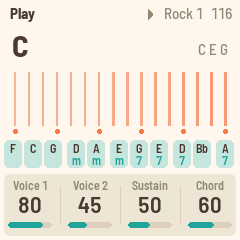
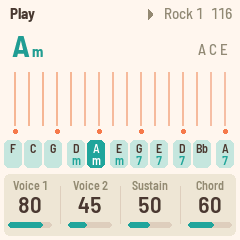
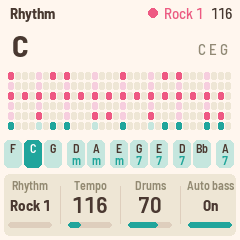
Playing
| White keys | The strum plate. Each key plucks a string of the chord: root, third and fifth, folded into an F#–F window, five groups up and a root on top, as on the Omnichord. Strings on the Setup page changes this: Linear plays the chord's tones straight up, without the folding; Fixed makes each white key play its own note, F3 to G5 in C major, moved by Transpose and Octave; Relative lays out the scale of the chord that is playing, up from its root. |
| Black keys | The chord buttons: F C G, Dm Am, Em G7 E7, D7 Bb, A7 in the first chord set. Hold ENV for the minor, LFO for the 7th, both for the m7. Change any of them on the Chords page (SEL). |
| PLAY · REC | The rhythm, on and off. REC is the chord sequence: it opens its page, where chord buttons write its steps, and PLAY plays it. |
| ARP | Chord hold: the chord keeps going after you let go. |
| OCT− · OCT+ | Move the strum plate an octave. |
| SELECT | Tempo. |
| ALGORITHM | Rhythm: the eleven it comes with, then your own (made in the editor). |
| PRESETS | Chord set, 1 to 8: what the black keys play. As they come, the sets are the same buttons in C, G, D, A, E, F, Bb and Eb. |
| KNOB 1–4 | The four values on the screen (see the pages below). |
| SAVE | Saves. Jambox FM-1 also saves by itself a few seconds after a change, once it's quiet. |
The pages
Each page puts four values on KNOB 1–4. EDIT steps through the pages.
- HOME: Play. Voice 1, Voice 2, Sustain, Chord level.
- HOME again: Melody. A tune made up as it plays, over the chords, while the rhythm runs and a chord sounds (held, CHORD HOLD or the sequence), on the strings' voice. Melody (Off, or its level), Density (from a few long notes to busy runs), Seed (each of 1 to 99 its own tune: the same seed over the same chords plays the same melody again, from PLAY), Repeat (how much it keeps to its opening figure rather than wandering). It follows rules songwriters keep: the chord's tones on the strong beats, mostly steps of the scale, a leap turned back from, a two-bar figure heard again over the next chords, and four-bar phrases ending on the root or third. You can strum along over it.
- SEQ: Rhythm. Rhythm, Tempo, Drums level, Auto bass (on: the bass and chord play in time with the rhythm).
- FX: Sound. Reverb (the strings' send), Space (the plate's size), Width, Chord rev (the chord and bass's send). The drums stay dry.
- SEL: Chords. Change the chord on any black key: press the key, then turn Root (KNOB 1) and Type (KNOB 2). The change goes into the chord set in use (PRESETS), so each set can hold a song's chords. KNOB 3 is Transpose (−6 to +6). KNOB 4, Invert, is how that button's chord lies: OM, as the Omnichord has it (its notes folded into one fixed octave, the root in the bass); Root, root position; 1st and 2nd, the inversions, with their bottom note in the bass too (C/E, C/G). Dots under a chord's name show it. (OCT− and OCT+ still move the strum plate's octave.)
- GLO: Setup. Strings (Triads: the white keys play the chord's tones, folded into one octave a group as on the Omnichord; Linear: the same tones straight up the keys, five octaves from two below the middle to two above, each key higher than the last; Fixed: their own notes, a scale; Relative: the scale of the chord that is playing), Shift (with Relative: the scale moved along the keys, −6 to +6 of its steps, for a melody that sits elsewhere than from the root up), Tune, MIDI out. Press GLO again for Setup 2: Lights (On: the key lights, and the unlit buttons glow dimly so they can be read; Keys: the key lights only; Off), Dark (the screen in dark colours), Harp and Chord (the voice of the strings and of the chord: the Omnichord's, or a sound of a DX7 bank given to it with the editor). And once more for Setup 3: Sync start (the rhythm waits for your first chord), Bass (the bass against the chord: 50 as it comes, 0 none, 100 twice as loud) and Mel rec (recording a step's melody: Replace, each time round with notes replaces it; Layer, adds to it).
- REC: Sequence. A chord sequence: eight tracks of up to 32 steps, each step a chord for a number of beats. The track in use plays round while the rhythm runs; hold REC and press one of the first eight chord buttons for another, which starts when the one playing comes round. With the rhythm stopped, press chord buttons one after another: each writes a step. KNOB 1 picks a step, KNOB 2 and 3 change its Root and Type, KNOB 4 its Beats (turned down to End, the sequence ends before that step). The rhythm and tempo can change as it plays. PRESETS plays the same sequence in the key of another chord set. REC again on this page switches the sequence off. Melodies on the steps: OCT− gives the step at the cursor a melody made for its chord (again: another), OCT+ copies a step's melody or pastes it into a step without one, OCT+ held takes it away; a note on the step shows it. A track with melodies plays them, the same each time round, and rests on its other steps. Your own: hold OCT− to record the step's melody. The rhythm plays a bar to count in, on the step's chord, then the step round and round: what you play on the white keys (or MIDI channel 1) is its melody, to the nearest sixteenth, one note at a time. Each time round you play in is a take (Replace or Layer, as Setup 3 has it); one you leave alone keeps the last. OCT− again (or PLAY) stops. Two notes on the step show a melody of your own; OCT+ copies, pastes and takes it away as the others.
MIDI
MIDI comes in over USB and the TRS jack (the FM-1's jack is an input), and goes out over USB.
- In, channel 1. Notes pluck the nearest string.
- In, channel 2. Play a chord on a keyboard and it becomes the chord, as if you'd pressed a black key.
- In, clock. The rhythm follows MIDI clock and start / stop; the screen shows EXT for the tempo.
- Out (on by default, Setup page). The strings on channel 1, the chord on 2, the bass on 3, the melody on 4, the drums on 10, and clock with start / stop when the rhythm runs on its own tempo.
To go back to the official firmware, use the installer's "Back to the stock firmware", or M-VAVE's updater, M-UPGRADE, from m-vave.com/download. Omnichord is a trademark of Suzuki; M-VAVE and FM-1 are trademarks of their owners. Jambox FM-1 is not affiliated with any of them.
Jambox FM-1 is inspired by and forked from FoMni-1.